Tag: PEEP 백도어

  • Fake Job Interview Scam Infects 30,000 Devices — Why the Contagious Interview Campaign Really Targeted Developers

    Fake Job Interview Scam Infects 30,000 Devices — Why the Contagious Interview Campaign Really Targeted Developers

    Key Summary

    • According to a joint cybersecurity advisory, the Contagious Interview campaign has infected at least 30,000 devices across more than 100 countries
    • Funds or account credentials were exfiltrated from more than 7,000 crypto wallets, with reported damages of approximately $10.71 million (USD 10.71M)
    • The primary targets identified were individual-level freelancers and professionals, including web designers, engineers, and crypto experts

    This article examines, from a threat intelligence perspective, the impact of North Korean targeted threats—exemplified by the fake job interview format—on developers and crypto users, and presents immediately deployable detection and response procedures for practitioners

    Table of Contents

    The ‘Contagious Interview’ campaign, disguised as fake job recruitment, swallowed 30,000 laptops and 7,000 crypto wallets in a single sweep. A joint cybersecurity advisory laid bare the full scale of the damage: more than 100 countries, at least $10.71 million.

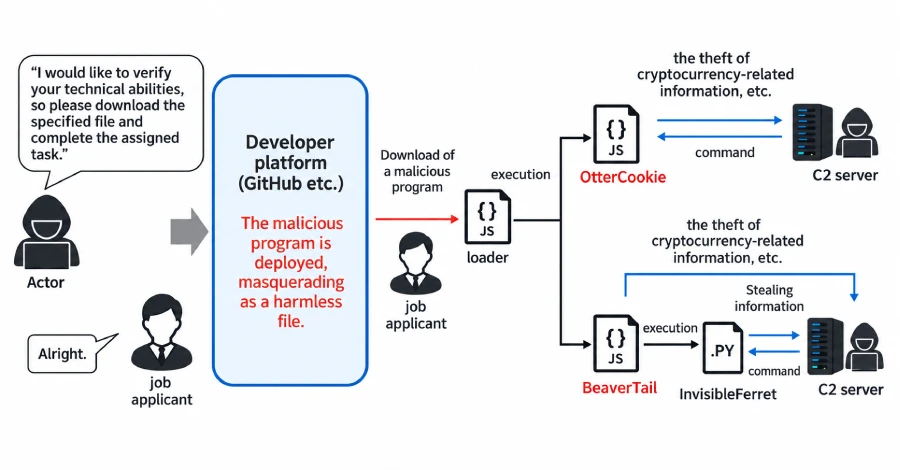
    The operation, which began in mid-2024, was classified as ‘WaterPlum.’ Web designers, blockchain engineers, and freelance developers were the primary targets. Under the guise of a coding test during the interview stage, victims were tricked into installing malicious npm packages. The PEEP backdoor, disguised as a browser extension, then siphoned off seed phrases and session cookies.

    What I find most significant about this incident is the ‘industrialization’ of the fake job interview scam. A single infection is enough to drain wallet seeds, GitHub tokens, and cloud keys at once. Developers serve as the external touchpoint for small organizations, making them high-value targets.

    Why the Fake Job Interview Scam Targeted Developers

    From the attacker’s perspective, developers are a goldmine. They are likely to hold main account privileges, access to build pipelines, and internal repository keys. As remote interviews have become commonplace, actions that would normally raise suspicion—such as ‘screen sharing,’ ‘downloading files for a test,’ or ‘installing browser extensions’—have become natural within a hiring context.

    The actual compromise flow is as follows. The attacker initiates contact through a fake job interview message and schedules an interview, then hands over a ‘technical assessment’ repository. One of the dependencies is the PEEP backdoor. The moment it is installed, MetaMask seeds, GitHub tokens, and cloud credentials are transmitted to an external C2 server.

    Stage Action Exfiltrated Data
    1. Initial Contact Fake job interview outreach via LinkedIn and Telegram —
    2. Infiltration Coding test repository delivered; tricked into installing npm package Execution privileges
    3. Collection PEEP backdoor deployed as a browser extension Session cookies, wallet seeds
    4. Exfiltration Credential rotation, cloud key exfiltration GitHub and AWS tokens

    Practical Application Points

    Practical Application Points

    The moment interview tools and assets coexist on the same device, you become the primary target of the fake job interview scam. Separating these two is the first gatekeeper.

    • Use a separate device for interviews. Never take coding tests on a device that holds company assets or your main wallet. Conduct them only on a clean virtual machine or with a disposable account.
    • Clone external repositories in an isolated environment. Run static analysis and SBOM checks before npm install. Even familiar package names can be tampered with.

    What to Do Right Now

    • Separate your interview GitHub account from your primary work account, and revoke all tokens once the interview is over.
    • Move the seed phrase of your main crypto wallet to an offline paper backup, and store it separately from the hot wallet used for daily transactions.
    • Enable hardware security key-based multi-factor authentication on major accounts such as GitHub, AWS, and Vercel, and rotate access keys every 30 days.
    • If an interviewer requests ‘recording’ or ‘screen sharing,’ treat it as a red flag on the spot and verify the legitimacy through a separate channel with the hiring manager.
    • When installing npm dependencies, make npm audit and the --ignore-scripts option your default.

    The Fake Job Interview Scam Never Ends

    The terrifying thing about the fake job interview scam is that there is no ‘end.’ Once a seed phrase is exposed, attackers can trace every wallet address derived from that same seed. The seed that flows into a MetaMask extension is, in itself, a transaction signing key.

    In my view, the real insight this campaign reveals is that the boundary of security responsibility has shifted to the individual endpoint. No matter how thoroughly an organization deploys SSO and EDR, a single developer’s laptop with a sticky note containing a seed phrase is enough to compromise the whole system.

    Frequently Asked Questions

    What channels do fake job interview scams use to make contact?

    LinkedIn DMs and Telegram messenger are the most common. Recently, Telegram-based ‘technical assessment’ DMs have surged sharply. The Hacker News’s initial report also highlighted this channel expansion.

    What are the red flags during the interview stage?

    A typical pattern is when a coding test repository is sent at the last moment and results are demanded right after npm install. Abnormally high urgency, or restricting contact to Telegram only, are also warning signs.

    What should I do if I’ve already installed the npm package?

    Immediately disconnect from the internet and move funds from your main wallet to a cold wallet with a new seed. Then, from a separate device, invalidate session cookies and reissue all cloud keys.

    Is a hardware wallet safe?

    It is relatively safe if the seed phrase has never entered your PC. However, browser-side channels like the PEEP backdoor can intercept the transaction signing itself, so you must always verify the amount and recipient address on the device display right before signing.

    Stage-by-Stage Hiring Security to Block the Fake Job Interview Scam

    To block the fake job interview scam, security gates must be formalized at every stage of hiring. The starting point is breaking the assumption that ‘interview = zone of trust.’

    Hiring Stage Current Practice Improved Approach
    Initial Contact Free communication via email and messenger Use only company domain email; reject Telegram policy
    Technical Assessment Candidate’s personal repository used Assessments only in internal sandbox; repository whitelisting
    Final Interview Unrestricted screen sharing Demonstrations only on interviewer’s device; advance notice of recording policy
    Post-Hire SSO issued immediately 90-day least-privilege; regular key rotation

    100 countries, 30,000 devices, $10.71 million. The fake job interview scam is no longer something that can be stopped by ‘individual caution’ alone. Embedding security into the hiring process and ensuring that interviews and assets never coexist on the same device is the first line of defense.

    If you want to dive deeper into the technical flow, we recommend reading the 8-month WaterPlum attack timeline and how the PEEP backdoor works.

    Reference Sources

    This article was written with reference to the following source: The Hacker News — Contagious Interview Campaign Compromises 30,000 Devices, Steals $10.71M in Crypto

  • 5 Risks of the PEEP Backdoor: How an Attack Disguised as a Browser Extension Works

    5 Risks of the PEEP Backdoor: How an Attack Disguised as a Browser Extension Works

    Key Takeaways

    • Security firm SocketRadar has named and publicly analyzed an attack tool that disguises itself as a Chrome or Edge extension, calling it “PEEP.”
    • PEEP does not stop at stealing user credentials and session cookies; it also includes the ability to execute commands on the infected PC.
    • The tool is not designed for initial compromise. It is classified as a post-exploitation tool used by attackers who have already obtained administrator or command-execution rights to consolidate their foothold on the system.

    analysis

    Table of Contents

    Details have emerged on how the PEEP backdoor disguises itself as a Chrome or Edge extension and takes over the browser without the user noticing. The PEEP backdoor, named and analyzed by security firm SocketRadar, is not ordinary info-stealing malware. Its threat level is different because it is a follow-on tool used by attackers who have already obtained system privileges to leverage the browser as a launchpad.

    The part of this incident I find most significant is the installation stage. There is a high chance that an ordinary user would not even realize they have installed an extension.

    1. What is the PEEP Backdoor? The Tool Named by SocketRadar and What It Does

    SocketRadar classifies the PEEP backdoor as a tool for an attacker who already holds privileges to dig deeper roots into the system. Unlike initial-access malware, the PEEP backdoor runs on a PC where administrator rights have already been obtained and converts the browser into a surveillance and command-execution platform.

    The key point is that it completely bypasses the Chrome Web Store and the Microsoft Add-in Marketplace. The attacker downloads the extension file directly to the user’s PC and registers it, and the browser never even displays its usual “Add this extension?” prompt.

    2. Forging Integrity Values: The Technique That Makes It Look Like a Normal Install

    Chromium-based browsers store hash-based integrity values to check whether the extension preferences file has been tampered with. The PEEP backdoor forges these values to match the legitimate ones, neutralizing the verification step itself. As a result, the browser treats the extension as if it had been installed through a normal channel and shows no warning at all.

    This pattern is exactly as described in the Boannews article covering SocketRadar’s analysis. Attempts to abuse legitimate template mechanisms to plant a backdoor have recurred in the past. The StyleSmuggler zero-day in Magento environments is a case in point. Like the StyleSmuggler zero-day analysis, attacks that abuse legitimate bypass paths to plant backdoors keep evolving in the web and browser space.

    3. What the PEEP Backdoor Steals: From Accounts to PC Control

    The range of data it can collect is wide. By default, it targets the session cookies and account information of websites the user is logged into. On top of that, it includes the ability to run arbitrary commands on the infected PC, so it is no exaggeration to say the browser effectively becomes a remote-control console.

    For practitioners, what stands out is the persistence feature. Once planted, the PEEP backdoor survives browser restarts, providing the attacker with a stable entry point.

    4. Why It Is Not an Initial-Access Tool: What Its Position in the Attack Chain Means

    The PEEP backdoor is not a first-stage tool used to initially breach a PC. It is a “next-step” tool used by an attacker who has already obtained administrator privileges through phishing or vulnerability exploitation. In other words, if the PEEP backdoor is discovered on its own, you should assume that PC already has a bigger problem behind it.

    However, as these second-stage tools grow more sophisticated, routine review of installed extension lists becomes increasingly important for organizations. Even if initial access is not blocked, quickly spotting second-stage tools like the PEEP backdoor can limit the spread of damage.

    5. Key Issues: Web Store Policies and the Limits of Integrity Verification

    There are two structural problems this incident highlights. First, extensions that bypass official stores are effectively traded only on black markets and dark web channels, and ordinary users have no way to know about them in advance. Second, the integrity verification system itself cannot distinguish attacks that make a malicious file look like a legitimate one.

    Since this cannot be solved by user awareness alone, a redesign of browser vendor policies appears necessary. Unless mechanisms such as mandatory verification of file hashes and installation sources go beyond a simple pop-up, attacks similar to the PEEP backdoor are likely to keep appearing.

    Issue Summary

    • Installs that bypass the official store occur outside the user’s awareness
    • Integrity value forgery exposes a structural limit of the browser security model
    • Because the PEEP backdoor is a persistence-stage tool rather than a standalone one, its discovery should be treated as evidence of a larger intrusion
    • Extension list reviews often become a formality even at organizations with EDR in place

    What to Do Right Now

    • Open the extension lists in Chrome (chrome://extensions) and Edge (edge://extensions) right now and remove any items of unclear origin
    • Apply Group Policy (GPO) or admin console policies to block the installation of unofficial extensions
    • Review EDR rules so that child-process execution from browser processes (Chrome.exe, msedge.exe) is monitored
    • Reduce day-to-day use of administrator accounts and switch routine work to standard-user privileges
    • Apply browser updates regularly to pick up improvements to the integrity verification system itself

    FAQ

    Can ordinary users be infected by the PEEP backdoor?

    Not on its own. The PEEP backdoor is planted by an attacker who already holds administrator privileges, so a separate first-stage intrusion (phishing, vulnerability exploit, etc.) has most likely already occurred.

    Are extensions from the Chrome Web Store safe?

    Extensions that go through the Web Store receive some review, but they are not 100% safe. It is best to install only extensions from clearly identified publishers and to check their permissions regularly after installation.

    What symptoms should make me suspect the PEEP backdoor?

    If a specific extension reappears after being removed, the browser becomes abnormally slow, or you see logs of unknown processes spawning child processes, you should suspect a second-stage intrusion that could include the PEEP backdoor.

    Which policy is most effective for organizations?

    A combination of Group Policy blocking unofficial extension installs and EDR rules that detect abnormal behavior in browser processes is the most effective. A single control is bypassed too quickly on its own.