Key Summary
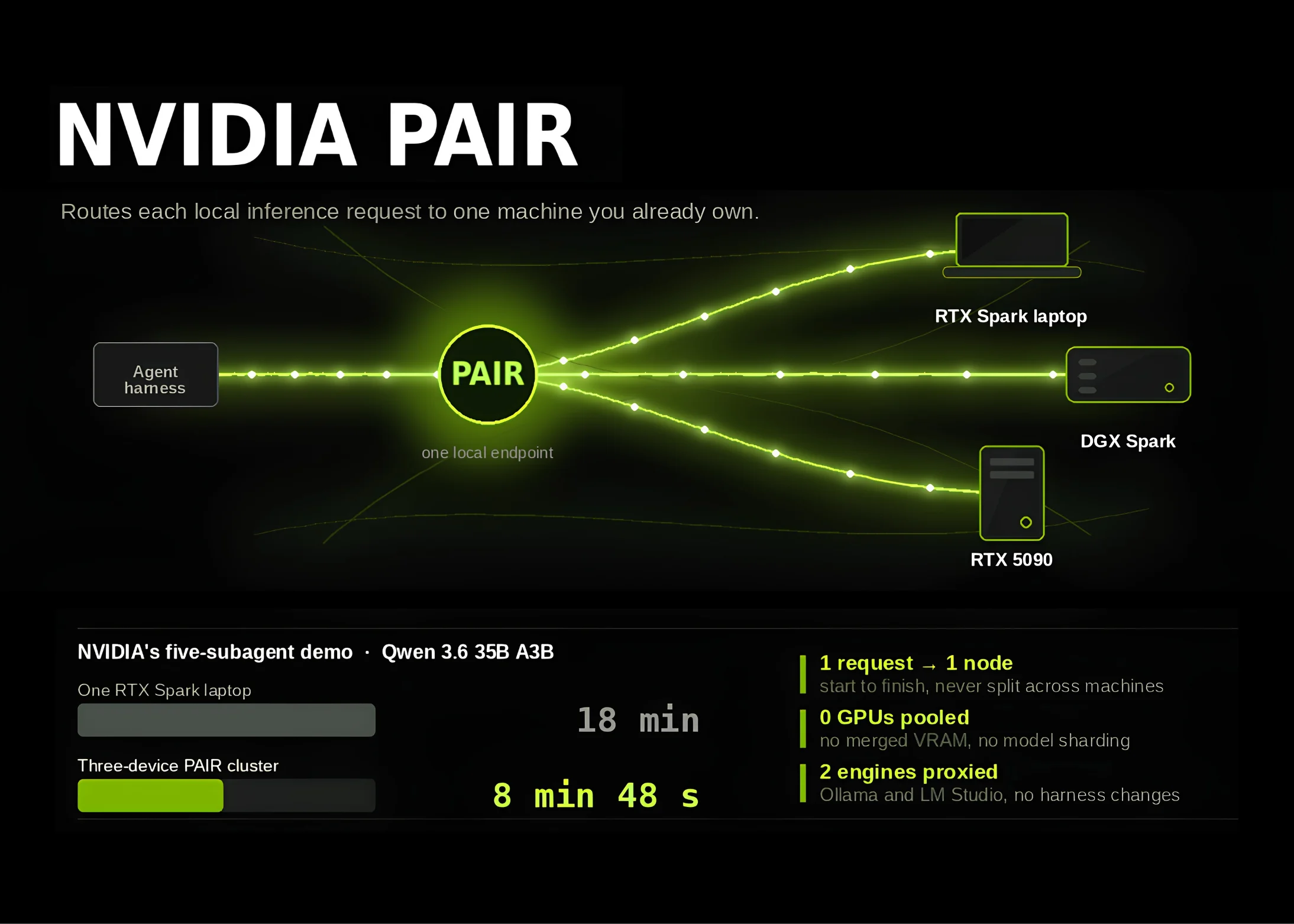
- PAIR is not a new inference engine but a virtual inference router that distributes traffic across existing Ollama/LM Studio engines on a local network
- Released as public beta v0.1.1, with signed installers available for Windows, macOS, and Linux; the full source code is published on GitHub under the Apache 2.0 license
- PAIR does not introduce a new cluster-specific API; instead, it proxies Ollama-compatible, LM Studio-compatible, and OpenAI-compatible endpoints, minimizing changes to existing agent harnesses
Analysis
Table of Contents
One RTX on your desk, a Mac mini in the study, a DGX Spark in the living room. NVIDIA PAIR ties these scattered GPUs together so you can use them as a single endpoint. The key point first: NVIDIA PAIR is not a new inference engine. It is a virtual layer that distributes traffic across existing engines like Ollama and LM Studio on a local network.
You might first wonder, “Why build a separate router?” In my view, the answer lies in the growth of multi-agent workflows. When the number of sub-agents grows to 5-10, a single machine’s GPU quickly becomes a bottleneck, and agent harnesses have repeatedly been asked to switch endpoints. NVIDIA PAIR proxies all three endpoint types – Ollama, LM Studio, and OpenAI-compatible. This means you can distribute traffic while barely touching your existing code.
NVIDIA PAIR Distribution – Signed Installers and Apache 2.0
Public beta v0.1.1 has been distributed as signed installers for Windows, macOS, and Linux. The full source code is published on GitHub under Apache 2.0, putting even organizations that cannot use commercial builds directly on the evaluation table. The specifications and download links can be confirmed in the initial MarkTechPost report.
Node Management – mDNS Discovery, 6-Digit PIN, and mTLS
NVIDIA PAIR first detects devices on the same subnet via mDNS. If discovery fails, IP addresses can be added manually, and pairing is completed with a single 6-digit PIN. After that, traffic is encrypted with generated-certificate-based mTLS. The fact that plaintext exposure risk is reduced when running on an office LAN without a VPN is attractive to operators.
From a practitioner’s perspective, the standout feature is setup automation. Remote engine installation and model downloads can be triggered on paired nodes. The manual work of downloading a 30GB embedding model to five machines one by one disappears. Once the operator handles the first boot on one machine, NVIDIA PAIR fills in the rest.
NVIDIA PAIR Compatibility – The No-Harness-Change Strategy
It is significant that NVIDIA PAIR does not bring a new cluster-specific API. If your agent harness already knows Ollama or OpenAI endpoints, you just point it at the router address and it works as-is. The same direction is read in our article on extending local agent workflows.
| Endpoint | Underlying Engine | Representative Use Case |
|---|---|---|
| Ollama-compatible | Ollama | Legacy agents, custom tools |
| LM Studio-compatible | LM Studio | Desktop GUI workflows |
| OpenAI-compatible | Multiple backends | LangChain, LlamaIndex families |
Performance Implications – The 5-Sub-Agent Demo
In the reported 5-sub-agent demo, a task that took an average of 18 minutes on a single RTX Spark node was reportedly reduced to around 8 minutes with multi-node distribution. The trailing comparison context for the reported figures has not been verified, but the evidence that “workflow-level time” decreased is meaningful. This means there is now room to maintain responsiveness while increasing the number of sub-agents.
However, these figures are the result of a specific model and prompt combination. For practical adoption, it is safer to run microbenchmarks with your own workflow. The view that NVIDIA PAIR’s value lies not in buying new GPUs but in reviving machines already on your desk is realistic. From a data governance perspective, it is also meaningful in that more traffic stays local.
Practical Application Points
- Prioritize an adoption path that keeps existing Ollama and LM Studio instances in place and simply layers the router on top.
- Align the flow where 6-digit PINs and mTLS certificates are auto-issued with your internal security guidelines in advance.
- Pre-define the candidate node list for distribution based on the number of sub-agents and model sizes in your multi-agent workflow.
- Before enabling the remote model download trigger, verify there are no conflicts with internal proxy and bandwidth policies.
Try It Right Now
- Download the v0.1.1 release notes from GitHub and verify the signed installer hash.
- Launch Ollama or LM Studio on one desktop machine and confirm that requests are proxied through the NVIDIA PAIR router address.
- Check whether the second node on your LAN is auto-discovered via mDNS, and if not, test manual IP addition as a fallback.
- After 6-digit PIN pairing, verify via logs that mTLS certificates are properly issued on both nodes.
- Point your frequently used agent harness at the OpenAI-compatible endpoint and measure the response round-trip.
Frequently Asked Questions
Is NVIDIA PAIR a new inference engine?
No. NVIDIA PAIR itself does not run models. It is simply a router that finds existing Ollama and LM Studio engines and sends traffic to them. Therefore, the models and prompts you already use remain unchanged.
Do I need to learn a new cluster-specific API?
No, you don’t. Since it proxies Ollama, LM Studio, and OpenAI-compatible endpoints, your agent harness only needs a one-line change to point at the router address.
Does it work in an office with external internet blocked?
Yes. Since all node-to-node communication is handled by mDNS and mTLS, you can operate it in a closed environment within your LAN. However, the initial model download will need to go out to the internet at least once.
What is the licensing burden?
The source on GitHub is released under Apache 2.0. You can compile, modify, and redistribute it internally, with only the obligations to preserve copyright notices and document changes.
Source Reference
This article was written after verifying the following original source: MarkTechPost — NVIDIA Releases Personal AI Router (PAIR): An Open Source Virtual Inference Router that Distributes Local AI Requests Across RTX, DGX Spark, and Mac Nodes